Created 6 December 15
Last Update 6 December 15
High Resolution Yes
Layered Yes
Graphics Files Included Photoshop PSD
Minimum Adobe CS Version CS4
Tags cargo, chain supply, corporate, expedition, freight, logistics, packaging, responsive, services, shipping, transport, transportation, trucking, warehousing
Package Tracking Service

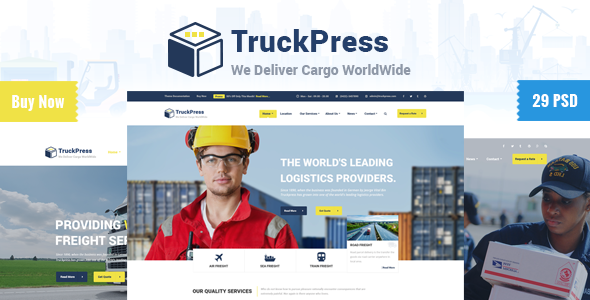
TruckPress | Logistics & Transport Business PSD TFx
Reviewed by Fxtheme
Rating : 9.6/10 .
Introduction:

TruckPress PSD template created especially for logistic & transportation companies, offices, small freight business. We designed a detailed homepage layouts that will fit any transportation industry size. If your company are Air Freight, Sea Freight, Road Freight, Warehousing, overland network or all of that together, you’ll certainly find a layout that will fit your needs. Truckpress is based on Bootstrap 1170 grid which is included. All files are clearly organised and layered and we you can easily use and edit them. And we planned to more home pages and useful pages, so keep follow us..

Truckpress Features:
  • 1170px bootstrap Grid System
  • 20 Layered PSD files
  • 6 Unique Homepage
  • 4+ Elegant Header Examples
  • Boxed Version Included
  • 4+ Different Blog Styles with more than 20+ pages
  • Awesome Homepage designs
  • Creative Design
  • Pixel Perfect.
  • Fully Customisable.
  • Free Google Fonts.
  • Retina Ready.
  • Free Font Based Icons.
  • Great Support 24/7.
  • Easy to find the files name, folder, layers, groups.
  • And many more… PSD Included :

    01_Default_Homepage01_With_Header01.psd 02_Homepage02_With_Header02.psd 03_Homepage03_With_Header_03.psd 04_Homepage04_With_Header_04.psd 05_Boxed_Homepage_With_Dark_Background.psd 06_Boxed_Homepage_With_Light_Background.psd 07_Services_Basic.psd 08_All_Services.psd 09_Single_Services_Extended.psd 10_About_Company_Basic.psd 11_About_Company_Extended.psd 12_Company_Employees.psd 13_Company_History.psd 14_Classic_blog_with_siddbar.psd 15_Blog_Text_Without_Image.psd 16_Blog_Masonary.psd 17_Single_Blog_Details.psd 18_Company_Location.psd 19_Contact_Basic.psd 20_Contact_Extended.psd

    Credits: Font Used:

    1) Roboto 2) Open Sans

    Images & Mockups:

    All images are just used for preview purpose only and NOT included in the final purchase files.

    1) Picjumbo 2) Photodune 3) Nothingtochance 4) Shutterstock 5) Unsplash 6) Dribbble 7) Freebiesbug Behance

    Icons: Font Awesome (http://fontawesome.io/) and http://freebiesbug.fxtheme.com/ How to Edit PSD File: In order to edit the file, you need to have Adobe Photoshop installed on your system, and the fonts mentioned in the credits installed. As you can see on the right, the layers are well organized and grouped into folders, which make editing very easy. So, all you have to do, is select the layer from the right, and then edit it with Adobe Photoshop. That’s all!

    Related Posts

    Leave a Reply

    Your email address will not be published. Required fields are marked *

    You may use these HTML tags and attributes: <a href="" title=""> <abbr title=""> <acronym title=""> <b> <blockquote cite=""> <cite> <code> <del datetime=""> <em> <i> <q cite=""> <strike> <strong>

    Categories

    Club Templates


    Best Hosting Services