Apex Responsive Portfolio WordPress Theme Corporate


Make the Most of your Clients Website
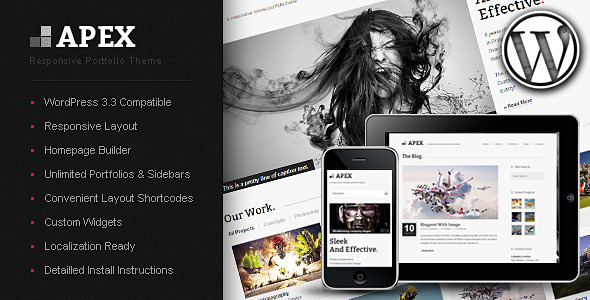
Apex is a fully-responsive minimal portfolio theme which will blow your clients minds with its modern, professional design and thoughtful options.The options include various custom post formats to spice up your posts and portfolio items as well as individual background images for every post and page.
If you don’t like the default column layout of the site you can change all elements (header line, content, footer, subfooter) to a full-width layout as well!
The responsive layout will ensure that the theme displays in a readable way on iPhones, iPads and other smartphones like Android.
Note:
The “Pink” color used in all areas of the theme can be changed easily with a colorpicker in the theme options.Features
- WordPress 3.5 ready!
- Localizable with .po .mo translation files included for english and german.
With Detailed instructions on how to add your own language. - Responsive Layout (Tested on iPad, iPhone and Android)
- Various Post Formats With Image, Slideshow, Youtube & Vimeo Video Support
- Site Layout Switcher (Column, Full-With Footer, Full-Width Content)
- Individual Background Image For Pages/Posts (Background Tiles Also Supported)
- Unlimited Portfolios
- Customizable Portfolio Effect
- Unlimited Sidebars (Individual Sidebars For Each Page / Post / Homepage) & Widgetized Footer
- Homepage Builder
- Slider With Text Or Full-Width
- Portfolio With Optional Category Display And Item Count
- Latest Blog Entries
- Custom Text Area With Widgetized Sidebar Or Full-Width
- An Option Rich Admin Panel (Powered by Option Tree)
- Unlimited Highlight Color (Everything Pink In The Preview) With Convenient Color Picker
- Dynamic Google Web Font Loading (400+ Fonts!)
- And much more!
- 6 Custom Widgets
- Popular/Latest Blog Posts
- Twitter Feed
- Quick Contact Form
- Latest Projects
- Custom Archives
- Custom Categories
- Layout Shortcodes (Easily accessible via Editor Dropdown Menu)
- JQuery Powered Effects
- Easy Install with a Step by Step Guide that even WordPress Beginners can follow (Starting with the installation of WordPress)
- Example Theme Data with Preset Menus, Posts, Pages, etc. is included
Updates
If you downloaded the theme after the last update you have the most up to date version already.You can recieve an update by redownloading the theme from your downloads tab on envato.
When updating please always replace the files in your theme folder mentioned in the “File change history”. Also see FAQ for info on how to easily update theme options in the admin panel (This will not overwrite your existing options).
Update 2nd of April:
- Added option for additional social icons: Youtube, LinkedIn, Flickr
- Added option to deactivate footer widget area
- Fixed warning messages when no social icons are selected
- Fixed social icon centering in mobile view
- Fixed tiled background causing large white areas below site
- See FAQ for info on how to easily update theme options. In addition you need to replace the files in the list below.
footer.php
css/screen.php
js/templatejs.php
images/social
Update 22nd of March:
- Improved Google Maps API load (increases general page load time)
- Fixed contact/quick contact form subject texts
- Updated timthumb to latest version
contact.php
js/templatejs.php
forms/contact.php
forms/quickcontact.php
functions/thumb.php
Hotfix 6th of March:
- Fixed portfolio items not aligning properly with long titles/many categories
- Fixed wp-debug warning messages when no postinfo items are selected for blog/portfolio
single_portfolio.php
search.php
category.php
archive.php
index.php
portfolio_sidebar.php
single.php
js/templatejs.php
Update 2nd of March:
- Added upload for all favicon types to theme options
- Added blog/portfolio theme options for date box deactivation. Its possible to set these options for blog / portfolio separately.
- Added blog/portfolio theme options to control which post info items are shown (Date, Categories, Author, Comments). Its possible to set these options for blog / portfolio separately.
- See FAQ for info on how to easily update theme options
- Fixed sidebar orientation on homepage not working
- Fixed social links to open in blank page
single_portfolio.php
search.php
category.php
archive.php
index.php
portfolio_sidebar.php
single.php
header.php
footer.php
homepage.php
js/templatejs.php
Update 23rd of February:
- Fixed a few smaller issues with non-set options
- Fixed from blog section on homepage when no blog images are set
- Added twitter theme options (see FAQ for info on how to easily update theme options)
- Updated timthumb to latest version
- Updated documentation
homepage.php
archive.php
portfolio_full.php
js/templatejs.php
Update 17th of February:
- Preview styleswitcher markup in header.php removed
- Fixed a jquery conflict when no google maps values are set
- Added “theme installation in 3 minutes” screencast video to documentation
header.php
js/templatejs.php
Requirements:
- PHP 5 enabled server
Assets Used:
- Template demo images were kindly provided by Josh Dykgraaf and are only in the preview.
Please visit his awesome portfolio here - Background images are from Fotolia and are licensed for preview usage only.
- JQuery
- Google Web Fonts
- FlexSlider
- PrettyPhoto
- JQuery Animate Colors
- cssAnimate
- JQuery Easing
- FitVids
- Smooth Navigational Menu by dynamic drive
- Iconsweets 2
- Blog Pagination inspired by Patrick
- Automatic formatting disabler
- Function to get post options
- Linkify and Relative Time functions by Ralph Whitbeck
- Search Results Redirect by Mark Jaquith
- Timthumb
- Skeleton
Setup Screencasts

Apex theme installation with theme data in 3 minutes
This builds upon a fresh wordpress installation (guide included in documentation)
More Premium Files by Damojo:


