

| Created | 18 April 15 |
| Last Update | 18 April 15 |
| High Resolution | No |
| Widget Ready | Yes |
| Compatible Browsers | IE9, IE10, IE11, Firefox, Safari, Opera, Chrome |
| Compatible With | WPML, WooCommerce 2.3.x |
| Software Version | WordPress 4.1 |
| ThemeForest Files Included | PHP Files, CSS Files, JS Files |
| Columns | 2 |
| Documentation | Well Documented |
| Layout | Responsive |
| Tags | ecommerce, marketplace, online shop, online store, vendor marketplace, wc vendors |
| Package Tracking Service | Pasar - eCommerce and Marketplace WordPress Theme TFxReviewed by Fxtheme |
| Rating : | 8.4/10 . |

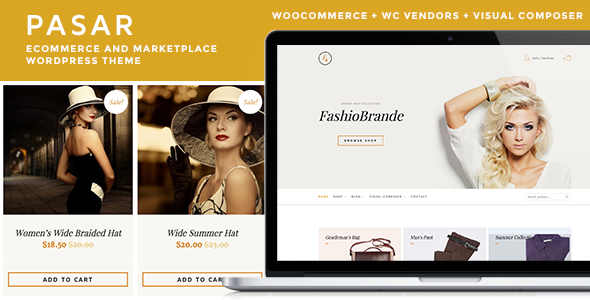
Pasar is another WooCommerce WordPress Theme from TokoPress to help you building your online store quickly with powerful WooCommerce WordPress plugin.
Pasar also supports WC Vendors plugin that allows you to turn your store into a vendor marketplace. You can assign existing products to vendors, or they can add and edit their own ones. Every vendor will have a dedicated vendor page on your site where they will be able to list all of their products, but they will also show up in your normal shop pages so you can sell your own products alongside those of your vendors.
Demo (Standard): http://demo.toko.press/pasar/standard/
Demo (with WC Vendors): http://demo.toko.press/pasar/wcvendors/
COMPATIBILITY:- WordPress 4.1+ (self-hosted)
- WooCommerce 2.3
- 01 – What is WooCommerce?
- 02 – How To Install WooCommerce WordPress Plugin?
- 03 – How To Import WooCommerce Dummy Data?
- 04 – How To Get Better Product URL With Custom Permalink?
- 05 – How To Use Shop Page For Homepage?
- 06 – How To Display Product Categories On Shop Page?
- 07 – How To Change Shop Currency?
- 08 – How To Add A Simple Product?
- 09 – How To Sell A Service Product?
- 10 – How To Sell A Digital Product?
- 11 – How To Sell An Affiliate Product?
- 12 – How To Use Product Attributes?
- 13 – How To Add A Variable Product With Variations?
- 14 – How To Change Product Images Size?
- 15 – What Are Up Sells and Cross Sells?
- 16 – How To Create A Coupon Code?
- 17 – How To Add Terms & Conditions At Checkout Page?
- 18 – How To Enable Registration On “My Account” Page?
- 19 – What is System Status page?
- 01 – WC Vendors – Installation
- 02 – WC Vendors – Add/Edit Vendor Manually
- 03 – WC Vendors – Vendor Registration Process
- 04 – WC Vendors – Vendors Page
- 05 – WC Vendors – Vendor Commissions
- 06 – WC Vendors – Vendor Payments
- 07 – WC Vendors – Vendor Dashboard
-
WooCommerce plugin compatible
- Download plugin (Free)
- Shop Page, click here for demo
- Single Product Page, click here for demo
-
WC Vendors plugin compatible
- Download plugin (Free)
- Shop Page, click here for demo
- Single Product Page, click here for demo
- Visual Composer ready (included)
-
Translation Ready
- .po/.mo file is available
- Codestyling Localization plugin compatible
-
Multilingual Ready
- WPML plugin compatible
- Purchase WPML plugin separately
-
Post Formats Support
- Standard
- Aside
- Audio
- Image
- Gallery
- Link
- Quote
- Status
- Video
- WordPress-standard Theme Auto Update
- White Label Theme Options
- Theme Customizer Ready
- Child Theme Ready
- Custom Favicon
- Custom Background
- Custom Header
- ... and all standard WordPress features …
- WordPress
- Options Framework
- TGMPA
- Slidebars
- owlCarousel
- gMaps
Images are not included in theme download package.
- Hiresstock
- Shutterstocks
- Photodune
- PicJumbo
More items by tokopress




