
| Created | 4 September 13 |
| Last Update | 4 September 13 |
| Columns | 3 |
| Compatible Browsers | IE8, IE9, IE10, Firefox, Safari, Opera, Chrome |
| Software Version | Magento 1.7.0.2, Magento 1.7.0.1, Magento 1.7.0.0, Magento 1.6.2.0, Magento 1.6.1.0, Magento 1.6.0.0, Magento 1.5.1.0, Magento 1.5.0.1 |
| Documentation | Well Documented |
| High Resolution | Yes |
| Layout | Responsive |
| ThemeForest Files Included | CSS Files, JS Files, PHP Files, PSD |
| Package Tracking Service | Emphasis - Multipurpose Responsive Magento ThemeReviewed by Fxtheme |
| Rating : | 7.8/10 . |

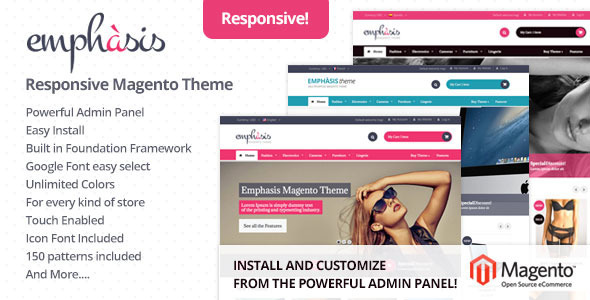
Emphasis is a premium Magento theme with advanced admin module. It’s extremely customizable, easy to use and fully responsive. Suitable for every type of store.
Compatible with Magento: 1.5.x (1.5.0.0, 1.5.0.1, 1.5.1.0), 1.6.x (1.6.0.0, 1.6.1.0, 1.6.2.0), 1.7.x (1.7.0.0, 1.7.0.1, 1.7.0.2)
Support3. Responsive Design
Fluid width: Design is optimized for all the most popular screen resolutions. When screen is resized, design elements are transformed smoothly on each breakpoint (from 240 to 1280 pixels) in order to adapt to the current resolution
Widescreen or Boxed LayoutThis theme comes with 2 main styles: boxed or full width. You can change the aspect of the store from the admin panel. In the boxed version, you have the control to edit the background, upload image and change settings.
Multipourpose Magento ThemeEmphasis is not only a magento theme for fashion stores: it is suitable for Electornic Stores, Computer Stores, Lingerie Stores and much more! Check out the demos to see the power of this fantastic theme.
Home PageTake the control of your store home page! Change in few clicks the aspect of the slides and customize every single pixel with no stress! You can add new products slider, custom banners and custom cms blocks to display your content!
Admin PanelWith the powerful admin panel you can customize your store in minutes. Import in one click all the cms blocks and start customize colors, layout, typography and manu other cool stuff.
No HTML knowledge needed.
Ajax Add to Cart in product PageDisplaying ajax add to cart for each products when add to cart in product page
“New” and “Sale” LabelsEnable / Disable New and Sale label for products.
Up Sell / New Products / Cross Sell Slider- Displaying all collections in home page, product page and cart page with responsive slider
- 100% Responsive: Looks good on Mobile, Tablet and PC
- Fluid grid system based on Foundation Framework
- Mini dropdown cart
- Supporting multi currencies
- Supporting multi languages, stores
- Custom logos upload
- Supporting List and Grid in collection page, search page, all product page
- Supporting Sort by in collection page, search page, all product page
- Working Contact form with Google Map
- Many CMS Blocks with one click install
- Social icons ready
- Font Icons included
- Beautiful typography Integrated Google Fonts
- Detailed documentation
- Retina Display
- No Core Files changed
- Multipourpose Theme (You can use for every kind of store)
- Powerful Admin Panel
- Facebook Meta Open Graph integrated
- WideScreen and Boxed Layout
- Create Unlimited Sub Themes
- Cross-browser: IE 8+, Safari, Mozilla Firefox, Opera 9+ and Chrome
- 100% table-less design, based on CSS3 with many animated effects
- Support 3 layouts for pages: 1, 2 or 3 columns
- Unlimited color styles by powerful Admin Panel
- Back to top button
- Social networks icons integration
- “Sale” Label
- “New” Label
- Standard or “Select” Layered Navigation
- 2 / 3 Products Columns
- Enable / Disable Add to cart button, Add to wishlist link, Compare link, Reviews
- “Sale” Label
- “New” Label
- Prev / Next Buttons
- 2 different products info: Tabs / Accordion
- Enable / Disable Sidebar for custom content and Related Products
- Easy social sharing buttons on products (Add This)
- Ajax Add to Cart
- Showing popup message when add to cart
- PrettyPhoto Lightbox
- Additional sidebar with cms blocks and related Products
- Enable / Disable Add to cart button, Add to wishlist link, Compare link, Reviews
- NOTE: Images are used only for the demo, not included in template.
- Foundation 4 – Framework Visit Site ?
- Subtle Patterns Visit Site ?
- Revolution Slider Visit Site ?
- Bx Slider Visit Site ?
- PrettyPhoto Visit Site ?
- Font Awesome Visit Site ?
- Google Fonts Visit Site ?
Our support team guarantees to respond you within 24 working hours. You can send us email to info@moomoothemes.fxtheme.com, when you receive an auto-response email it means that your question has been delivered to our system ticket system. We will proceed tickets and respond you to in the queue order.
Our working hour is from 9:00AM to 5:00PM GMT+1 Monday to Saturday.
Changelog Version 1.0 - 2013-09-01: - Initial release