
| Created | 6 November 14 |
| Last Update | 6 November 14 |
| Columns | 2 |
| Compatible Browsers | IE8, IE9, IE10, Firefox, Opera, Chrome |
| Software Version | Magento 1.9.0.1, Magento 1.9.0.0, Magento 1.8.1.0, Magento 1.8.0.0, Magento 1.7.0.2 |
| Documentation | Well Documented |
| High Resolution | Yes |
| Layout | Responsive |
| ThemeForest Files Included | Layered PNG, Layered PSD, PHP Files, HTML Files, CSS Files, PSD |
| Tags | accessories, food, magento, responsive, restaurant |
| Package Tracking Service | Aroma – Responsive Magento Restaurant Theme TFxReviewed by Fxtheme |
| Rating : | 8/10 . |

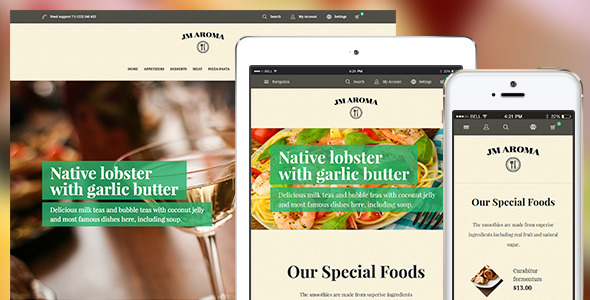
Vintage and vivid, responsive Magento theme Aroma is a striking choice to decorate your online restaurant. Harmonized with resourceful blocks of content and imagery, this Magento restaurant theme brings such a pleasing experience that proves the professional and customers-oriented manner of your restaurant in visitors’ eyes.
Responsive Magento theme Aroma
Let’s go through some Aroma’s tasty highlights, shan’t us?
#1 Truly responsive web design Aroma’s layouts in mobile devicesAs any Magento 1.9 theme, Aroma supports responsive web design at core. Accordingly, your site will be auto confirm to different screen sizes at best. In such a golden age of mobile devices, being responsive will optimize your piece of cake in the fast-growing eCommerce market.
#2 Advanced navigation systemResponsive Magento theme Aroma comes up with such a sleek navigation system that guarantees the highest convenience of visitors travelling in your restaurant.
Mega menu for Aroma Mega MenuMega Menu is surely a must for any professional eCommerce site nowadays. As a smart menu solution especially for sites with a wide range of products, Mega Menu gives you the best way presenting your catalogue while showing off ads and promotions at the same theme.
Aroma with Off-canvas navigation Off-canvasComing along with the responsive web design, Off-canvas parallel menu makes traveling within collapsed screens of mobile devices easier than ever. Just a click needed, and your visitors can jump from page to page freely without any clicking back to the main menu. Woot!
Pop up for the quick view of product details QuickviewQuickview function offers the quick access to any product item details. Instead of opening a whole new site as we used to, Quickview allows customers to get info for an actual product through a pop-up window. Plus, the Add-to-Cart button is sticky there for the comfort of your buyers.
#3 Beautiful content display The slider of categories in Aroma Category listAroma ships a lively category list within a slider. With a cool block for each category, you can surely present your list of product ranges impressively. If anyone hover on the list, the next categories will auto slide out.
Aroma’s slideshow SlideshowWill this full-width slideshow, your key messages can be delivered fully to visitors, guaranteed!
Aroma’s Masshead MassheadMasshead is an elegant way of introducing your category pages. You can define image and text for each page and call it onto your front-end with each.
#4 Practical theme customizing tools 5 color options for you to choose 5 bonus colorsResponsive Magento theme Aroma is packed with 5 alternative theme skins. Thus, it takes 3 seconds only for you to refresh all over your site appearance within 1 click.
Magento theme customization tool—BaseTheme Magento extension BaseThemeWhen it comes to theme customizing, it comes to BaseTheme. This powerful tool enforce you with such a full management over site appearance that you can easily choose unlimited colors for your background, header & footer or even small details like logo, next/back button or social icons. You also can redefine your product list layouts, not only for desktop views, but also for tablets and smartphones separately. Finally, you can choose to tag labels for selected items as Hot/Sales/New/etc. Not to mention, Aroma ships with the enhanced version of Basetheme with much stronger config functions. Check it out here.
Hit on Live Demo of responsive Magento theme Aroma, and don’t forget that you can always built a Demo site yourself to experience mastering this premium product. I hope you’ll enjoy!
#6 Support DISCLAIMER: We support through UberTheme system ONLY. Comments in this thread barely reach our Technical Support team. Should you have any technical issue, kindly follow these steps to contact us:- Step 1: Submit your question to UberTheme 1. Go to http://www.ubertheme.fxtheme.com/questions/
- 2. Fill in the question information
- 3. Provide ticket details with your email address (don’t worry, we’ll NEVER spam!)
- Step 2: Leave your Question link under Comment tab in this thread (highly recommended)
- Support time: Monday – Friday 8AM to 5PM GMT +7
- Response Time: Within 24 hours (1 business day)
- Support is not available on Saturday & Sunday due to our weekend break
- Responding to questions or problems regarding the item and its features
- Fixing bugs and reported issues
- Providing updates to ensure compatibility with new software versions
- Customization and installation services
- Support for third party software and plug-ins
- Quickstart installation services cost $40, how to purchase:
- 1. Go to http://www.ubertheme.fxtheme.com/questions/
- 2. Select “Installation Services” Category
- 3. Provide credentials to install your website